Checkout with Confidence
Payment Security Guaranteed
Return with Ease
Fast & Hassle-Free Process
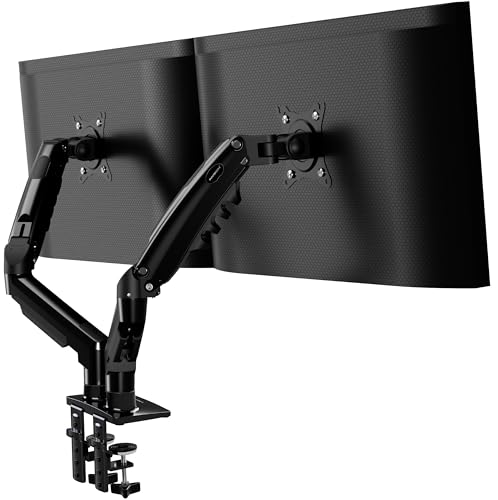
This product — Invision Monitor Arm Desk Mount for 19-32 Inch Screens - VESA 75/100mm Desk Clamp Stand - Tool Free Height Adjustment with Tilt Swivel Rotate - Increased Load Capacity from 2-9kg MX400 Dual Arm
Refer to the product listing for full specifications and care instructions. Check compatibility before purchase.
Invision Dual Arm Monitor Desk Mount for 19-32" Screens - VESA 75/100mm, Tool-Free Height Adjustment
Key Takeaway
Transform your workspace with this Invision Monitor Arm Desk Mount, designed for screens ranging from 19 to 32 inches. Priced at just £41.83, it features tool-free height adjustment and allows for tilt, swivel, and rotation, making it ideal for anyone looking to enhance their ergonomics and productivity. With an increased load capacity of 2-9kg, it’s perfect for professionals and gamers alike who want to optimize their setup for comfort and efficiency.
Frequently Asked Questions
What is Invision Monitor Arm Desk Mount for 19-32 Inch Screens?
The Invision Monitor Arm Desk Mount is a versatile mounting solution designed for 19-32 inch screens. It features a VESA 75/100mm desk clamp stand that allows for easy adjustment and positioning of your monitor.
How much does Invision Monitor Arm Desk Mount cost?
The Invision Monitor Arm Desk Mount is priced at £41.83. This affordable price offers excellent value for its tool-free height adjustment and enhanced ergonomic benefits.
What are the key features of Invision Monitor Arm Desk Mount?
Key features of the Invision Monitor Arm include tool-free height adjustment, the ability to tilt, swivel, and rotate your monitor, and an increased load capacity of 2-9kg. It also supports VESA mounting standards for easy installation.
Who is Invision Monitor Arm Desk Mount best for?
The Invision Monitor Arm is ideal for home office workers, gamers, and design professionals who require flexible monitor positioning. It is particularly beneficial for those looking to improve ergonomics and workspace organization.
How do I use/care for Invision Monitor Arm Desk Mount?
To use the Invision Monitor Arm, simply clamp it to your desk and adjust the height and angle as needed for optimal viewing. For care, regularly check the mounting screws for tightness and clean the arm with a soft cloth to maintain its appearance.
Fast Delivery
Quick & reliable shipping
Secure Shopping
100% secure transactions
Great Prices
Competitive deals daily
Expert Support
Here to help you choose
More Products You Might Like from multimonitor
View All


Please Note: When you order through these links, we may earn a commission at no additional cost to you.